Custom ERP for SMEs is no longer about choosing between expensive enterprise software and basic spreadsheets - it's about building systems that fit how your business works. As we move through 2026, artificial intelligence and no-code platforms are transforming what's possible for small and medium-sized enterprises, making true customization accessible without the traditional cost and complexity. Here's what every SME decision-maker needs to know before their next digital transformation move
Key Takeaways
Q1. What makes custom ERP different for SMEs in 2026?
Unlike traditional ERP that forces businesses to adapt to software, modern custom ERP adapts to your existing workflows using AI-powered no-code platforms - making it faster, more affordable, and genuinely tailored.
Q2. When should an SME consider moving to custom ERP?
When you have 10+ team members, clear processes that need standardization, multiple disconnected tools causing data chaos, or you're spending over 15 hours weekly on manual data reconciliation.
Q3. What's the biggest risk with ERP implementation?
Process mismatch—when the ERP doesn't fit your actual workflow, leading to either expensive customization or forcing teams into unnatural workarounds that kill productivity.
Q4. How long does implementation really take?
With modern no-code approaches, SMEs can deploy MVP modules in 2-6 weeks and complete phased rollouts in 8-12 weeks - dramatically faster than traditional 6–12-month timelines.
Q5. What should you expect to invest?
Implementation typically ranges from ₹1.5L to ₹8L depending on complexity, with ROI visible within 3-6 months through time savings, reduced errors, and better cash flow visibility.
Q6. Can you start small and expand?
Yes - the modular approach lets you begin with 1-2 critical workflows (like inventory + purchase orders) and add modules as processes stabilize and teams adapt.
Why SMEs Are Rethinking ERP in 2026
In 2026 is the inflection point for SME digitization. Competitive pressure, AI adoption, customer expectations, and hiring constraints are forcing businesses to automate or risk falling behind.
Yet the real issue isn’t lack of technology - it’s using the wrong technology.
The Hard Truth:
Most SMEs don’t struggle because operations are complex - they struggle because:
- They rely on patchwork tools
- Their processes live in spreadsheets
- Their teams become “human APIs”
- They use ERPs not designed for their scale or workflows
Research shows ERP failure rates range between 50%–75%, with SMEs suffering the worst outcomes because they cannot absorb the cost of failed implementations.
What’s changing in 2026 is a fundamental shift:
- SMEs are moving away from large, rigid ERP
- Toward modular, custom-configured, no-code ERP
- That fits the business instead of forcing the business to adjust
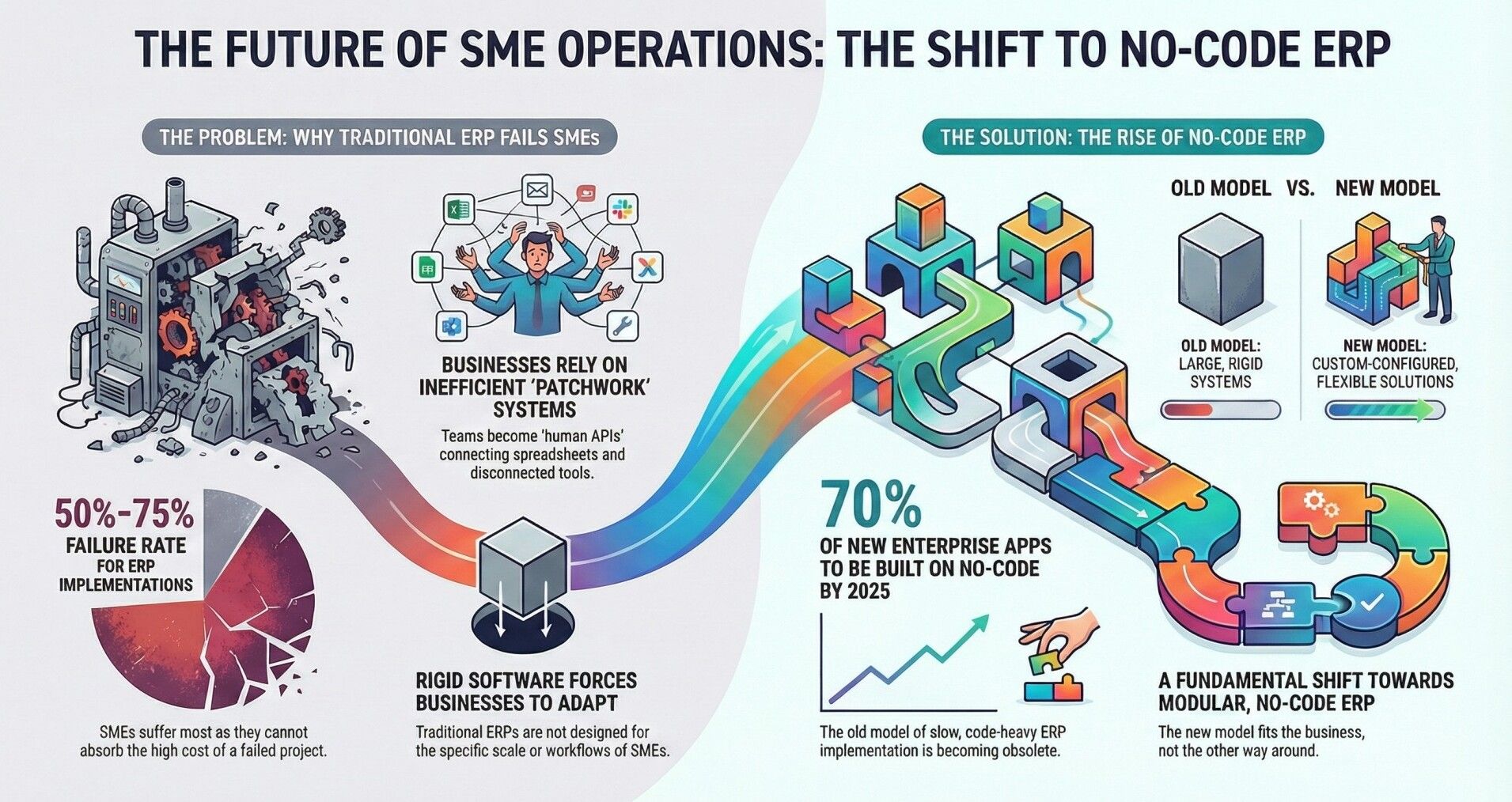
And with 70% of new enterprise apps expected to be built on low/no-code by 2025, the old model of slow, code-heavy ERP is gone.
What is a Custom ERP? (And Why SMEs Need a Different Definition Than Enterprises)
Custom ERP for SMEs means software that matches your business process exactly - not the other way around. While enterprises define custom ERP as extensive coding and multi-year implementations, SMEs in 2026 define it as configurable systems that adapt to their unique workflows without requiring developers.
Custom ERP vs Off-the-Shelf ERP vs Vertical ERP
Off-the-shelf ERP comes pre-built with modules for common business functions. These systems work well when your internal processes neatly align with their predefined templates., but customization either costs extra or simply isn't possible. For many SMEs, this means adapting your workflow to what the software allows - often a losing battle.
Vertical ERP is industry-specific software designed for particular sectors like manufacturing or healthcare. While more targeted than generic ERP, these still assume standardized industry processes that may not match your competitive advantage or specific operational quirks.
Custom ERP traditionally meant hiring developers to build software from scratch - a ₹50L+ investment taking 12-18 months. This model worked for large enterprises but priced out most SMEs.
Modern Custom ERP uses no-code configuration to deliver the benefits of custom software at off-the-shelf speed and pricing. You get exact process fit without custom coding, deployed in weeks rather than months.
If you're evaluating which approach truly fits your business model, this detailed comparison of custom ERP vs off-the-shelf ERP breaks down cost, scalability, and long-term trade-offs for SMEs.
The Real Problems SMEs Face Before Adopting ERP
Before we discuss solutions, let's be specific about the pain points driving SMEs toward custom ERP. These aren't abstract problems - they're daily frustrations costing time, money, and growth opportunity.
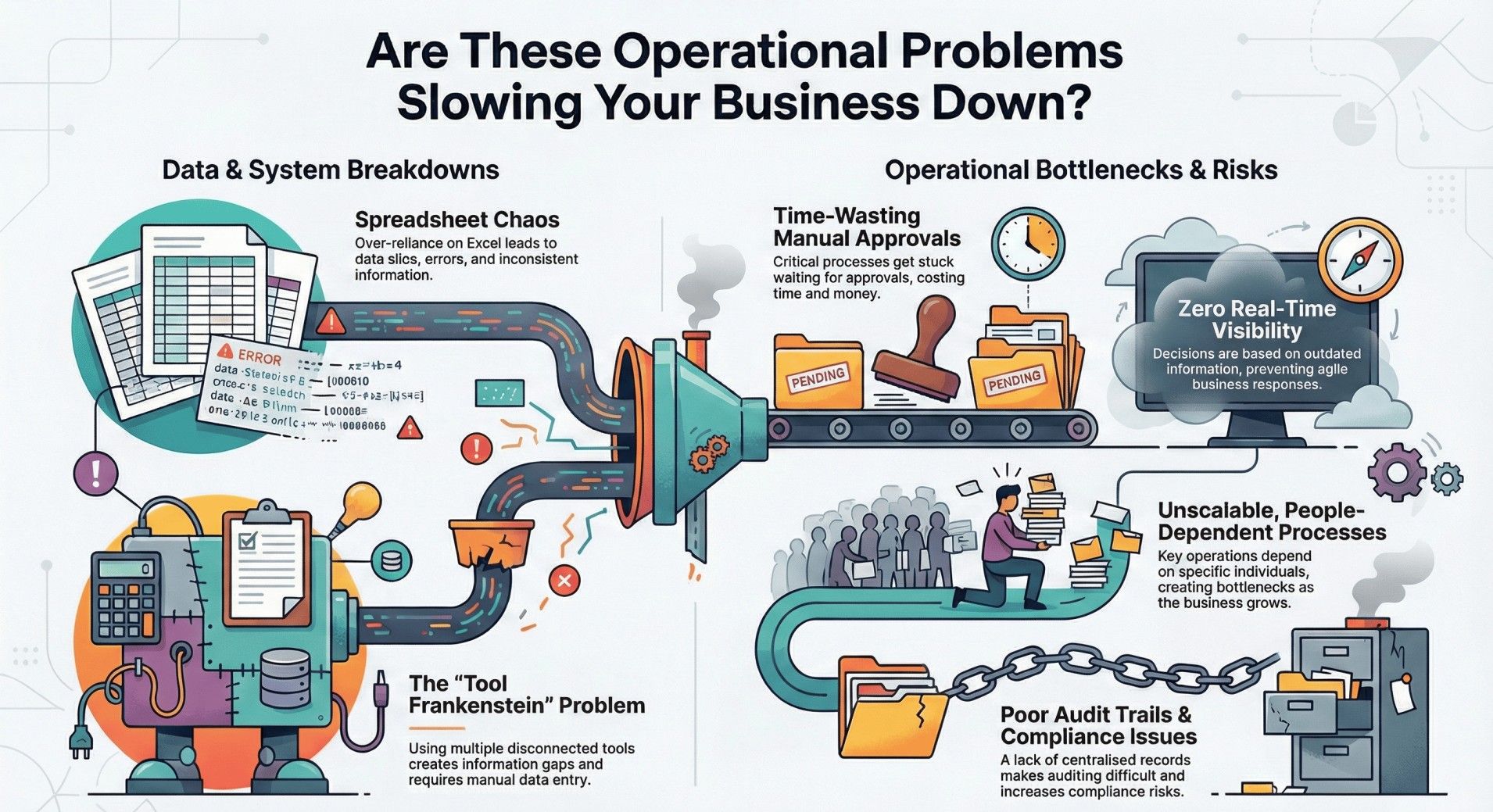
1. Spreadsheet Chaos: When Excel Becomes Your Enemy
Spreadsheets start as quick solutions but evolve into operational nightmares.
Excel becomes a liability at scale:
- % of spreadsheets contain errors
- Teams maintain multiple versions
- One formula change breaks the entire sheet
- No real-time visibility
This leads to stock errors, pricing mistakes, delayed decisions, and operational confusion.
2. Disconnected Tools: The "Tool Frankenstein" Problem
Most SMEs evolve into a patchwork: Like-
- Excel for inventory
- Tally for accounting
- WhatsApp for approvals
- Google Forms for requests
- Email for purchase orders
Each tool works in isolation, creating what we call "operational debt" - the hidden cost of manually connecting systems that should talk to each other.
This fragmentation means your team becomes the "human API," copying data between systems, reconciling mismatches, and spending hours on work that should be automated. One operations manager described it perfectly: "We spend three hours every Monday morning making sure everyone's spreadsheet matches reality."
3. Manual Approvals: Where Time and Money Disappear
Without workflow automation, approvals happen via email chains or WhatsApp threads. Purchase orders wait days for sign-off, expense reimbursements get lost, hiring decisions stall.
Beyond the time cost, this creates fraud risk - because manual processes lack audit trails, it's easier for unauthorized transactions to slip through.
4. Zero Real-Time Visibility
When data lives in disconnected systems, you can't answer basic questions without manual compilation: What's our actual inventory right now? Which customer payments are overdue? What's our cash position for next month?
This lack of visibility means you're managing by rear-view mirror - making decisions based on last week's or last month's reality rather than today's situation.
5. Unscalable Processes: When Everything Depends on People
"Check with Ramesh, he'll know" or "Priya handles that" are danger signs. When critical processes live only in people's heads, you can't scale without proportionally increasing headcount. Every new hire needs extensive training, key people become bottlenecks, and if someone leaves, tribal knowledge walks out with them.
ERP should document these processes so they become repeatable, trackable, and independent of any individual person.
6. Lack of Audit Trail and Compliance Issues
Manual processes leave no trail. When an auditor asks "Show me all purchase orders above ₹50,000 from last quarter" or a customer disputes an invoice, you're digging through emails and spreadsheets. For industries with regulatory requirements, this isn't just inefficient - it's a compliance risk.
Custom ERP vs Off-the-Shelf vs Patchwork Tools Pros and Cons
Understanding your options clearly is essential for making the right decision. Let's compare the three approaches most SMEs consider:
Off-the-Shelf ERPs: The Template Approach
Pros:
- Quick to deploy (if processes fit)
- Lower upfront cost
- Established vendor support
- Regular updates and maintenance handled
Cons:
- Limited customization without expensive add-ons
- Forces process changes to match software
- Paying for features you don't need
- Vendor lock-in with proprietary data formats
Where They Fit:
Businesses with very standard processes, minimal competitive differentiation, and willingness to adapt workflows to software limitations.
Custom-Coded ERP: The From-Scratch Approach
Pros:
- Perfect process fit
- Complete control over functionality
- No vendor lock-in (you own the code)
Cons:
- High cost (₹50L+ for SMEs)
- Long timeline (12-18 months minimum)
- Ongoing developer dependency
- Maintenance becomes your responsibility
- Technology debt as code ages
Where It Fits:
Large enterprises with complex, truly unique processes and dedicated IT teams. Rarely suitable for SMEs.
Patchwork Tools: The Improvised Approach
Current Reality:
Most SMEs operate here - Excel for inventory, Tally for accounting, WhatsApp for approvals, email for coordination. It feels manageable until you calculate the hidden costs.
Hidden Costs of Patchwork:
- Manual data entry and reconciliation (15-30 hours weekly)
- Errors from duplicate entry or version mismatches
- No single source of truth
- Team frustration and turnover
- Lost opportunities from slow response times
Realistic Comparison Table for Off-the-Shelf vs Custom Coded vs Patchwork Tools vs No-Code Custom
| Factor | Off-the-Shelf | Custom-Coded | Patchwork Tools | No-Code Custom (Creviz) |
|---|---|---|---|---|
| Implementation Cost | ₹3-15L | ₹50L+ | ₹0 (ongoing chaos cost) | ₹1.5-8L |
| Time to Deploy | 2-4 months | 12-18 months | Immediate (but broken) | 2-6 weeks (MVP) |
| Process Fit | 60-70% | 95-100% | 40-50% | 90-100% |
| Ease of Change | Limited/expensive | Difficult/expensive | Easy but chaotic | Easy and systematic |
| Scalability | Moderate | High | Very low | High |
| Risk of Failure | 50-75% | 40-60% | Already failing | 20-30% |
| Maintenance | Vendor-handled | Your responsibility | Constant firefighting | Vendor-handled |
The Verdict:
No-code custom ERP delivers the process fit of custom-coded solutions at the speed and cost closer to off-the-shelf - without forcing you to abandon your competitive workflow advantages.
For a deeper 3-year cost and ROI comparison of build, buy, and configure paths, refer to our ERP decision guide for SME founders.
When SMEs Should NOT Go for a Custom ERP
Building trust means being honest about when our solution isn't right - and custom ERP isn't always the answer. Here are scenarios where you should wait:
You're NOT ready if:
- Your business is very early-stage (less than 5-6 team members) - spreadsheets and simple tools may still suffice
- Processes are constantly changing or undefined - stabilize workflows before automating them
- No one internally can serve as project champion - ERP needs someone who understands both business and can drive adoption
- You expect ERP to fix fundamental business model problems - software automates processes, it doesn't create strategy
- You're unwilling to invest time in implementation - even fast deployments require process documentation and team involvement
- Leadership won't commit to change management - ERP fails without top-down support
Better alternatives for these situations:
- For very small teams: Use simple cloud tools and revisit ERP when you hit 10+ people
- For unstable processes: Document and optimize workflows first, then automate
- For limited commitment: Start with standalone automation for one critical pain point, prove value, then expand
_The honest truth:_ ERP done wrong is worse than no ERP. If you're not genuinely ready, it's better to wait and do it right.
From our _[Creviz]_ experience working with SMEs, the biggest ERP challenges don’t come from “technology” - they come from misalignment between the ERP and real business processes.
Take _Aspect Coatings_ manufacture specialized industrial coatings, for example. They were scaling operations across production, contractor management, inventory, QC, and dispatch. But no traditional ERP could support their unique batch-flow logic, finishing workflows, or contractor-based production model. To keep moving, teams started maintaining multiple parallel Excel sheets, creating delays, mismatches, and high dependency on individuals.
They eventually adopted a fully custom, end-to-end ERP built on Creviz, covering every workflow in a single flow - from Sales to Production to Dispatch. Reconciliation disappeared. Real-time visibility went up. Operational efficiency finally matched their growth.
On the other hand, _Evolve Back_ Premium luxury resort chain known for high-end customer experiences across multiple destinations didn’t need a full ERP - they needed just one critical workflow fixed. Their Oracle NetSuite setup lacked a custom allotment management system, leading to over-bookings and manual data entry. Creviz built a tailor-made module integrated directly with NetSuite, solving the issue without replacing the main ERP.
The takeaway: SMEs rarely fail because they don't adopt ERP. They fail because they adopt ERP that doesn’t match their business. Custom-fit systems eliminate this problem entirely.
What is the Modern Way to Build Custom ERP?
The 2026 approach to custom ERP represents a fundamental shift from traditional development. Here's what's different and why it matters for SMEs:
1. No-Code Platforms Instead of Coding
Build apps visually with pre-built components (forms, workflows, dashboards).
This reduces development time by 80–90%.
2. AI-Assisted Workflow Generation
AI now helps with:
- Process mapping
- Workflow design
- Data models
- Validation rules
- Automation suggestions
You describe your process - AI builds the first draft workflow.
3. Modular Architecture
Start with 1–2 modules → expand later:
- Inventory
- Purchase orders
- Production
- CRM
- HR
- Accounting workflows
4. Faster Delivery: Days, Not Months
Weekly iterations instead of long sprints.
Feedback loops become instant.
5. Reduced Vendor Lock-In
Your workflows are visual, documented, and independent - not buried in code.
6. Upgrading Becomes Easy
Business evolves → workflows can be updated by power users, not developers.
This agility is crucial for SMEs that need to move fast in response to market changes or growth opportunities.
If you want to understand how AI workflow automation, predictive analytics, and natural-language changes work in practice for SMEs, this no-code AI ERP article walks through real examples and future trends.
Implementation Roadmap Tailored for SMEs
Let's break down a realistic implementation timeline and approach that works for small and medium-sized businesses:
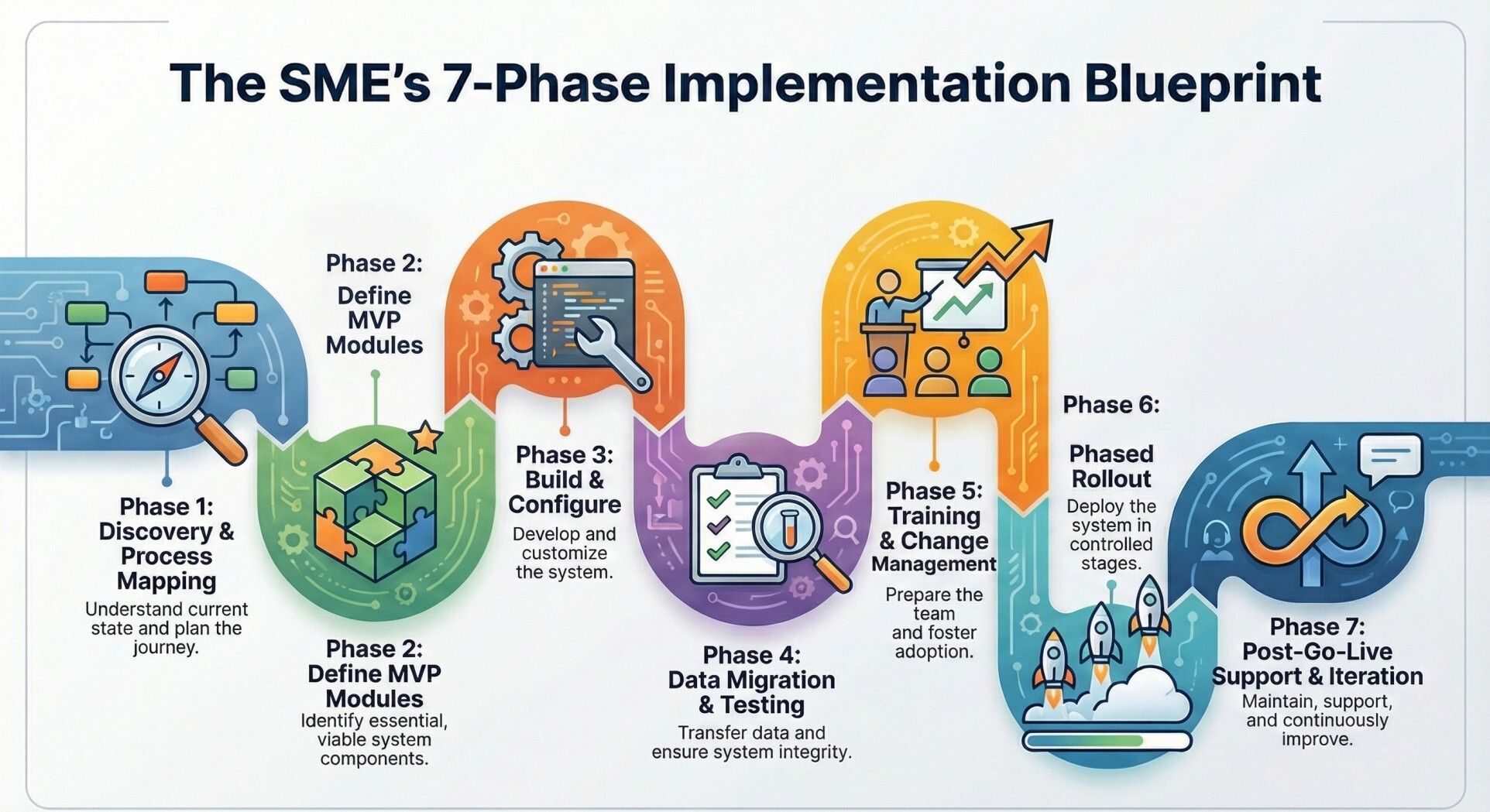
Phase 1: Discovery & Process Mapping
Before building anything, document how work actually flows today. This isn't about creating idealized process charts - it's about understanding reality, including workarounds, pain points, and exceptions.
Key Activities:
- Interview department heads and key users
- Map current workflows for each critical process
- Identify data sources and systems in use
- Document approval hierarchies and business rules
- Define success metrics for each process
Deliverable: Process documentation highlighting automation opportunities and quick-win areas.
Phase 2: Define MVP Modules
Don't try to automate everything at once. Identify 1-2 critical workflows that will deliver immediate value and are relatively standalone.
Common Starting Points:
- Manufacturing: Production planning + inventory management
- Trading: Purchase orders + inventory tracking
- Services: Project tracking + billing workflows
- Retail: Inventory + sales order management
Selection Criteria:
- High pain today (time wasted or error-prone)
- Clear process with defined steps
- Limited dependencies on other systems initially
- Manageable data migration needs
- Key stakeholder buy-in
Phase 3: Build & Configure
This is where no-code speed becomes apparent. Using platform templates and AI assistance, you configure forms, workflows, automations, and dashboards to match your documented processes.
Development Approach:
- Start with industry templates as foundation
- Customize fields, rules, and flows to your specifics
- Build user roles and permissions
- Create relevant reports and dashboards
- Configure notifications and alerts
Iteration Cycles:
- Weekly demos to stakeholders
- User feedback incorporated immediately
- Adjustments made in days, not sprints
Phase 4: Data Migration & Testing
Clean and migrate historical data from spreadsheets, old systems, or manual records. This step matters because users won't trust the new system if starting data is wrong or incomplete.
Data Work:
- Clean master data (customers, products, vendors)
- Migrate historical transactions (as needed)
- Validate accuracy through spot checks
- Run parallel for one cycle to verify
Phase 5: Training & Change Management
Technical deployment is half the battle - user adoption is the other half. Train teams on new workflows, emphasizing how it makes their work easier.
Training Strategy:
- Role-based training sessions (users see only what they need)
- Create simple video tutorials for reference
- Identify and empower internal champions
- Establish feedback channels
- Set expectations about adjustment period
Phase 6: Phased Rollout
Deploy department by department rather than enterprise-wide. This limits disruption and lets you refine based on real usage before expanding.
Recommended Sequence:
Sales/Order Entry (they need clean data flowing forward)
Inventory/Operations (process orders and track stock)
Finance/Accounts (close the loop with billing and payments)
HR and support functions (once core operations are stable)
Phase 7: Post-Go-Live Support & Iteration
The first few weeks after launch require attentive support. Users encounter edge cases not covered in training, processes need minor adjustments, and reports may need tweaking.
Support Structure:
- Daily check-ins first week
- Weekly for next month
- Rapid turnaround on configuration changes
- Usage analytics to identify adoption gaps
- Collect and prioritize enhancement requests
Cost & ROI: What SMEs Should Expect
Let's talk real numbers without the fluff or hidden costs that plague traditional ERP pricing.
Implementation Investment Range
Typical Project Costs:
- Small implementation (2-3 modules, 10-20 users): ₹1.5L - ₹3L
- Medium implementation (4-6 modules, 20-50 users): ₹3L - ₹5L
- Complex implementation (7+ modules, 50+ users, integrations): ₹5L - ₹8L
What's Included:
- Process documentation and workflow design
- System configuration and customization
- Data migration from existing systems
- User training and documentation
- Go-live support and stabilization
What Drives Cost:
- Number of modules and workflows
- Complexity of business rules and approvals
- Volume of data migration
- Integration with existing systems (accounting, e-commerce)
- Level of customization beyond templates
You can model your own investment using a simple ROI framework and India-specific price bands explained in this custom ERP cost and ROI for SMEs article.
Ongoing Costs
Beyond implementation, budget for:
- Monthly platform fees: ₹15,000 - ₹50,000 (based on users and modules)
- Support and maintenance: Usually included in platform fees
- Future enhancements: As processes evolve, typically 10-15% of implementation cost annually
Compare this to traditional ERP where annual maintenance alone runs 18-25% of license costs.
Many SMEs underestimate the long-term cost differences between packaged software and configurable systems - especially when calculating total cost comparison between custom and off-the-shelf ERP over 3–5 years.
ROI Areas: Where SMEs can See Returns
1. Manual Hours Saved
If three people spend 15 hours weekly on data entry, reconciliation, and status updates, that's 45 hours weekly or 2,340 hours annually. At ₹500/hour (conservative), that's ₹11.7L in reclaimed productivity annually.
2. Faster Invoicing → Better Cash Flow
Reducing invoice generation time from days to hours means faster payment cycles. If you bill ₹50L monthly and reduce your collection cycle by even 5 days, you free up approximately ₹8L in working capital.
3. Reduced Stockouts and Overstocking
Real-time inventory visibility prevents lost sales from stockouts and reduces capital tied up in excess inventory. A 10% improvement in inventory turnover on ₹1 crore inventory frees up ₹10L in working capital.
4. Reduced Leakage and Errors
Manual processes leak money - incorrect pricing, duplicate orders, unauthorized purchases. Automating approvals and validations typically reduces these errors by 70-80%, saving 1-3% of annual revenue for most SMEs.
5. Faster Decision-Making
When data is real-time and visible in dashboards, decisions that took days (waiting for someone to compile reports) now take minutes. This speed advantage compounds into better customer response and faster pivots.
6. Better Reporting and Compliance
Automated audit trails and one-click reporting save time during audits, tax season, and board meetings. More importantly, better data visibility helps identify problems early -before they become costly.
Industry-Specific Use Cases
Custom ERP solves different problems across industries. Here's how it applies to specific sectors:
Manufacturing
Core Challenges: Production scheduling chaos, material shortages, quality control gaps, delayed job-card reporting
Custom ERP Solution:
- Bill of Materials (BOM) tracking with real-time component availability
- Job-card digitization with shop-floor updates
- Quality checkpoint automation with photo/signature capture
- Automated reorder alerts for raw materials
Impact: Reduced production delays by 35%, improved material utilization by 12%, enhanced quality traceability
Trading & Distribution
Core Challenges: Multi-location inventory confusion, supplier coordination, pricing inconsistencies, credit management
Custom ERP Solution:
- Unified inventory view across warehouses
- Automated purchase order workflows with approval hierarchies
- Credit limit enforcement and receivables tracking
- Real-time margin visibility by SKU and customer
Impact: Eliminated stockouts in main SKUs, reduced working capital in inventory by 15%, improved supplier payment accuracy
Professional Services
Core Challenges: Project tracking across teams, timesheet compliance, profitability visibility, scattered client communication
Custom ERP Solution:
- Project lifecycle management with milestone tracking
- Integrated timesheet and billing automation
- Client portal for transparent progress updates
- Resource utilization analytics
Impact: Increased billable hours capture by 15%, reduced project delivery delays, improved cash collection cycle
Hospitality
Core Challenges: Booking management, housekeeping coordination, F&B inventory waste, guest service issues falling through cracks
Custom ERP Solution:
- Centralized reservation system with channel sync
- Housekeeping task assignment and status tracking
- Ingredient-level inventory with expiry alerts
- Guest feedback ticketing and resolution workflows
Impact: Reduced double-bookings to zero, improved housekeeping turnaround by 30%, cut F&B waste by 20%
Construction & Real Estate
Core Challenges: Site expense tracking, contractor payments, document management, project milestone visibility
Custom ERP Solution:
- Project-wise expense and budget tracking
- Contractor/vendor portal with milestone-based payments
- Digital document repository with approval workflows
- Site progress dashboards with photo documentation
Impact: Improved budget accuracy by 25%, reduced payment disputes, enhanced stakeholder transparency
What is Build vs Buy vs Configure means to SMEs
As an SME decision-maker, you face three fundamental choices. Let's clarify what each really means:
BUY (Off-the-Shelf ERP)
Reality: Quick to start, but you're adapting your processes to someone else's template. Works if your operations are highly standardized and you're willing to change how you work.
Best For: Businesses with commodity processes and minimal competitive differentiation in operations.
BUILD (Custom-Coded from Scratch)
Reality: Perfect fit but expensive, slow, and risky. You own the code but depend on developers forever. One mid-level manufacturing SME spent ₹65L and 16 months building custom ERP, only to discover ongoing maintenance consumed their small IT team.
Best For: Large enterprises with truly unique processes and substantial IT resources.
CONFIGURE (Modern No-Code Approach)
Reality: The middle path - exact fit achieved through configuration rather than coding. You get customization speed and cost that actually works for SMEs.
The Key Difference:
Configuration uses pre-built, tested components assembled to match your workflow. Coding builds everything from scratch. Configuration is like assembling a custom car from high-quality parts versus hand-manufacturing every bolt and wire.
If you’re evaluating which ERP path makes sense for your SME in 2026, this build vs buy vs configure ERP decision guide breaks down cost, risk, and ROI over 3–5 years.
From Excel/Tally/WhatsApp to Custom ERP
If you're currently running on spreadsheets, accounting software, and messaging apps, you're not alone - and the transition is more manageable than you think.
The Typical Current State
Most SMEs operate with:
- Excel for inventory, customer lists, project tracking
- Tally for accounting and GST compliance
- WhatsApp for approvals and coordination
- Email for supplier and customer communication
- Google Forms for internal requests
We’ve documented the eight clear signs that your SME has outgrown this Excel–Tally–WhatsApp stack and how to move off it safely in our Excel and Tally to custom ERP migration guide.
This works until it doesn't - usually when you hit 15-20 people or start losing opportunities because information isn't accessible fast enough.
Signs You've Outgrown This Approach
You know it's time when:
- Someone asks "what's our current inventory?" and nobody can answer confidently within 10 minutes
- You've had a customer complaint because different team members gave them conflicting information
- Financial close takes 2+ weeks because data needs reconciling across multiple sources
- New employees need 3-4 weeks to understand where information lives and how processes work
- You've missed opportunities because approvals were stuck in someone's email or WhatsApp
- Audit or compliance requirements feel impossible with current documentation
The Transition Path
Step 1: Centralize Data
Move from distributed spreadsheets to a single database. Even if processes stay manual initially, having one source of truth eliminates 80% of data reconciliation headaches.
Step 2: Digitize Approvals
Replace WhatsApp and email approvals with proper workflows. This creates audit trails, prevents things from getting lost, and speeds up decision-making through automatic routing and reminders.
Step 3: Connect Processes
Link related workflows so data flows automatically. When a sales order is confirmed, inventory is reserved, purchase requisitions trigger if stock is low, and finance sees upcoming revenue - all without manual handoffs.
Step 4: Integrate Accounting
Keep Tally for GST compliance if you prefer, but push transactions to it automatically from the ERP rather than manual entry. This maintains compliance while eliminating duplicate work.
Step 5: Add Intelligence
With clean, connected data, you can now build dashboards, generate insights, and forecast trends - capabilities impossible with fragmented systems.
Why No-Code + AI Matter for SME ERP in 2026
The convergence of no-code platforms and AI is democratizing capabilities that were previously exclusive to large enterprises.
1. Lower Delivery Time
No-code reduces development time by 80-90% because you're not coding from scratch. AI accelerates this further by suggesting workflows, generating forms based on descriptions, and automating routine configuration tasks.
2. Better Process Discovery
AI can analyze your current data patterns and suggest workflow improvements you might not have considered. It identifies bottlenecks, flags approval delays, and recommends automation opportunities based on actual usage.
3. Natural-Language Changes
Instead of submitting IT tickets for changes, authorized users can request modifications in plain language: "Add approval step for purchase orders above ₹50,000" or "Send automatic reminder if invoice isn't paid within 15 days." AI interprets intent and suggests configuration changes.
4. Automatic Dashboard Generation
AI can analyze your data and suggest relevant dashboards for your role. Instead of spending weeks deciding what reports you need, AI proposes starting points based on what similar businesses track, which you then customize to preferences.
5. SME-Friendly Cost Structure
Traditional custom development required large upfront investments because of high developer costs and long timelines. No-code platforms spread costs over time through subscription models, making enterprise-grade customization affordable for SMEs operating on quarterly budgets.
The 2026 reality: Organizations using low-code development platforms save an average of $187,000 per year - ROI that transforms feasibility for small and medium-sized businesses.
For a deeper look at how no-code and AI are changing ERP for SMEs - including examples, cost and time comparisons - explore our dedicated no-code AI ERP guide for SMEs.
How Creviz Delivers Custom ERP for SMEs
Creviz combines AI-powered workflow intelligence with no-code flexibility to deliver truly custom business applications tailored to SME needs.
1. AI-Powered Discovery Process
Our AI analyzes your industry, process descriptions, and current pain points to suggest optimal workflow structures. Instead of starting from a blank canvas, you begin with intelligent templates that already match 70-80% of your needs, then customize the remaining 20-30%.
2. No-Code Configuration Platform
Every business function - from purchase approvals to customer onboarding - can be configured visually. Drag-and-drop interface builders, workflow designers, and rule engines let you create exactly what you need without technical dependencies.
3. Modular, Start-Small Approach
You don't need to automate everything on day one. Start with your most painful 1-2 workflows, prove value, train teams, then expand. Each module integrates seamlessly as you grow.
4. Industry Template Library
Manufacturing, trading, services, retail - we've built starting templates based on hundreds of SME implementations. These templates encode industry best practices while remaining fully customizable to your specifics.
5. Dedicated Success Management
Every implementation includes a dedicated success manager who understands both technology and SME operations. They guide you through discovery, configuration, training, and ongoing optimization - acting as your extended team rather than just a vendor.
Ready to see how custom ERP can work for your business? Book a workflow discovery session where we map your processes and identify automation opportunities - no commitment required.
Want to explore how real businesses leveraging Creviz? Read Customer Stories to see how other SMEs have transformed their operations.
Frequently Asked Questions About Custom ERP
Is a custom ERP expensive for SMEs?
Modern no-code custom ERP typically costs ₹1.5L-₹8L for implementation - far less than traditional custom development (₹50L+) and often comparable to off-the-shelf solutions when you factor in customization needs and unused features you're forced to pay for.
How long does ERP implementation take for SMEs?
With no-code approaches, MVP implementations deploy in 2-6 weeks, with full phased rollouts completing in 8-12 weeks. This is 3-5x faster than traditional ERP implementations that stretch 6-12 months.
Can I migrate data from Tally and Excel?
Yes, data migration from spreadsheets, Tally, and other systems is part of implementation. We clean, structure, and transfer your historical data so you start with accurate information from day one.
We’ve covered the full Tally-to-Creviz and Excel-to-workflow migration process in our dedicated SME migration guide.
What's the smallest business that should consider custom ERP?
Generally, businesses with 10+ employees, clear repetitive processes, and annual revenue over ₹2 crore see meaningful ROI. Below this, simpler tools may suffice - above this, efficiency gains justify investment.
How secure is cloud-based ERP?
Cloud ERP platforms use enterprise-grade security including data encryption, regular backups, role-based access controls, and compliance with data protection standards. For most SMEs, cloud security exceeds what they could achieve with on-premise systems.
Do we need IT staff to manage the system?
No dedicated IT team is required. The platform handles infrastructure, updates, and security. Your team focuses on using the system, with configuration changes handled through simple visual interfaces or support requests.
Can the system grow as our business grows?
Yes - modular architecture means you add functionality as needed. Start with core workflows, add departments, users, or modules as you scale. No need to switch platforms or rebuild as you grow.
What if our process changes?
Process changes are expected and easily accommodated. Because the system is configured rather than hard-coded, workflow modifications happen in days, not months. You adapt the system to your evolving business, not the reverse.
How do you ensure our team actually uses the new system?
Change management is built into implementation - role-based training, internal champions, feedback channels, and support during the critical first weeks. We also design workflows to be simpler than current manual processes, creating natural adoption incentive.
Can we integrate with our existing tools?
Yes, most platforms offer pre-built integrations with common tools (accounting software, payment gateways, e-commerce platforms) and APIs for custom integrations. The goal is to connect, not replace, tools that already work well.
What happens if we need features not available in templates?
That's the advantage of custom ERP- if templates don't cover your specific need, we configure additional workflows, fields, or automation rules to match exactly what you require. True customization without coding.
How do we measure if the ERP is actually working?
Define success metrics during implementation (time saved, error reduction, faster processing) and track them through built-in analytics. Most SMEs see measurable improvements in 30-60 days - faster approvals, cleaner data, reduced manual work.
Take the Next Step
Custom ERP for SMEs in 2026 isn't about choosing between expensive enterprise software and basic spreadsheets - it's about building systems that genuinely fit how your business works. With AI-powered no-code platforms, true customization is now accessible at SME-friendly costs and timelines.
The question isn't whether to digitize, but how to digitize in a way that preserves your competitive advantages while eliminating operational friction.
Start your journey: Book a free workflow discovery call where we analyze your current processes and identify automation opportunities specific to your business.